Your invoice JSON passes its schema. Does it match the invoice?
A practical invoice-to-JSON exercise shows how a changed ID, missing row or swapped quantity can survive a shape check. Follow the source, compare the response and learn what a match actually proves.
In this article
- Quick answers
- Start with a question about the source
- 1. Extract from the invoice before looking at the answer
- 2. Separate a shape check from a source check
- 3. Reproduce one mismatch without an AI account
- 4. Check the rows even when the total looks right
- 5. Read the result as a diagnosis, then repeat carefully
- Sources & method
Quick answers
Can valid invoice JSON still contain wrong values?
Yes. In this exercise, the supplied schema accepts the expected keys and scalar types without enforcing the invoice’s exact values. The changed-ID control passes that schema but disagrees with the source.
What do I need to try the exercise?
Use the supplied synthetic invoice and instruction, an AI tool that accepts a PDF or image, and the returned JSON. Our free checker needs no signup and runs its comparison in the browser.
The practical takeaway
Check the response shape, then compare values and row identity with the source. A schema pass alone does not establish that an invoice was extracted faithfully.
Start with a question about the source
An invoice response can be valid JSON, satisfy its JSON Schema and still name the wrong item. Those checks answer different questions: can the response be parsed, does it meet the declared structure, and does it preserve what the document says? This guide walks through the third question without discarding the first two.
The exercise uses AI Extraction Checkup, a free tool we built at AI Toolcast. It has one fictional four-row invoice, a fixed instruction and a known answer. You can inspect the public source or follow the same checking approach in your own workflow; the hosted checker itself accepts only this supplied exercise. No signup is needed, and it does not run an AI model for you.
1. Extract from the invoice before looking at the answer
Bring an AI service that can read a PDF or image and a browser for the checker. The service may have its own fees, access limits and data policy. On Checkup, choose “Download practice PDF,” attach that fictional invoice in your chosen service, and use “Copy extraction instruction.” Use the image version from the public repository if your service needs an image.
Keep the instruction intact. It asks for strings for known scalar values, preserves leading zeroes, specifies date and decimal representations, and keeps each item associated with its printed line_id. An unreadable scalar should be null rather than a guess. The discount is a positive amount to subtract, despite the minus sign on the document. These are declared exercise rules, not universal invoice conventions.
Save the returned response before consulting “Inspect the checked answer” or the repository’s answer file. Giving that answer to the model would defeat this exercise. Paste just the JSON object into “Your JSON response,” without Markdown fences, then choose “Compare response.” The comparison runs on your device; you can copy or download the resulting report.
2. Separate a shape check from a source check
The supplied Draft 2020-12 schema requires named fields, rejects extra object properties and allows strings or null for scalar values. It allows up to 20 line items but does not require the source’s four rows through a minimum length. Its description says to preserve leading zeroes; description is an annotation, not a validation assertion enforcing those characters.
That is a deliberate boundary of this schema, not a limitation that all JSON Schemas share. Another schema can impose tighter value, pattern or array-length constraints. A schema validator checks the constraints actually encoded in the schema; it does not read the invoice merely because a description mentions it. Source comparison needs a checked reference and explicit matching rules.
To check the shape separately, choose “Download schema” and load that file plus your unchanged JSON into a validator supporting Draft 2020-12. Keep nulls and strings as returned. Checkup’s “Compare response” performs its fixed comparison rules; it is not a general JSON Schema validation service.
3. Reproduce one mismatch without an AI account
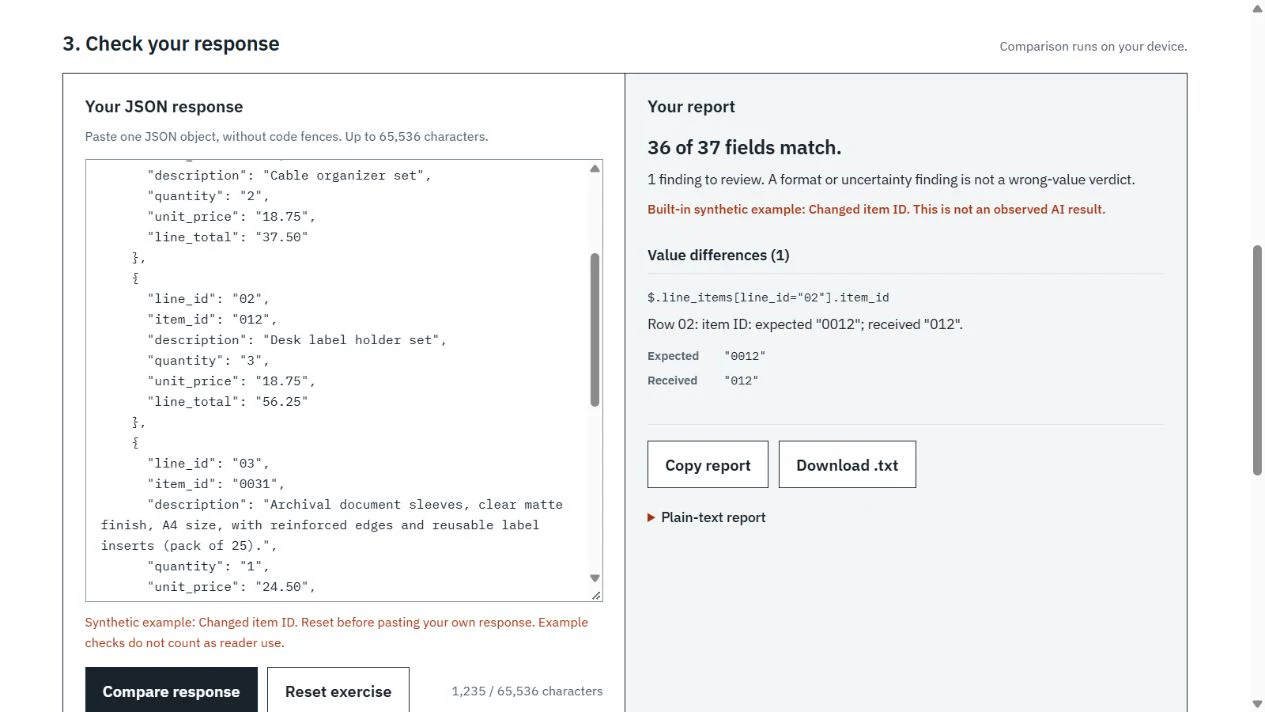
For a quick demonstration, open “Try a synthetic example,” select “Changed item ID,” choose “Load example,” then “Compare response.” This is a deliberately prepared control, clearly labeled on the page. It changes row02’s item_id from the source’s “0012” to “012.” Both are strings, so this supplied schema accepts them; Checkup reports the changed value and 36 matching fields out of 37. Choose “Reset exercise” before pasting your own response after a demonstration.
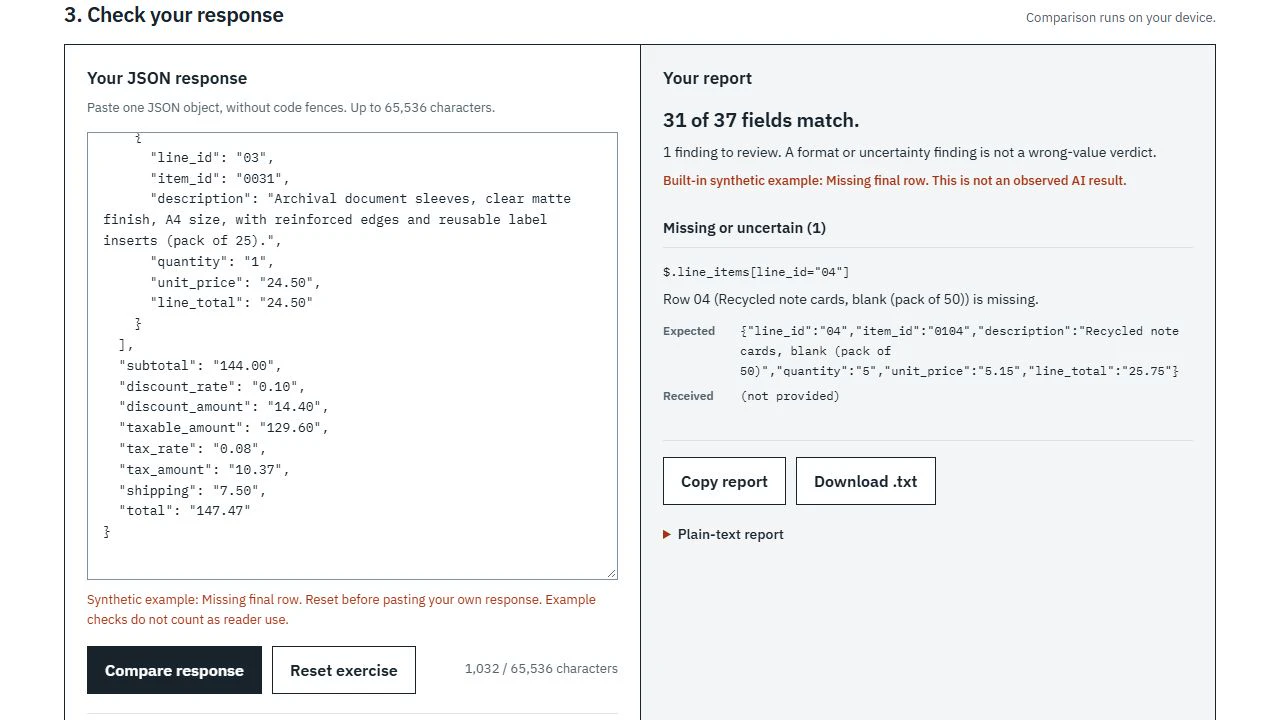
Now try “Missing final row.” It still passes the supplied schema, but the comparison reports row04 as missing: six expected scalar fields are absent, leaving 31 of 37 matching. One missing-row finding therefore does not mean only one field was lost. Use the report’s expected and received values to locate the discrepancy in the invoice rather than silently replacing the response.
4. Check the rows even when the total looks right
The “Swapped quantities” control changes both quantities and their associated line totals between two equal-price rows. Its invoice total remains $147.47, and the altered rows remain arithmetically consistent. Yet four fields disagree with the source, so the comparison finds 33 of 37 matching. A plausible total cannot tell you whether each item kept its own quantity.
Across all six controls, the exact supplied schema passes every response. Checkup matches 37/37 for the correct answer and harmless whitespace/row reordering, 36/37 for the changed ID, 31/37 for the missing row, 33/37 for swapped quantities, and 36/37 for the wrong-total control. These are reproduced behaviors of prepared examples, not six observed AI outputs or an accuracy rate for any model.
5. Read the result as a diagnosis, then repeat carefully
Rows are aligned by their unique printed line_id rather than array position. Reordering rows or normalizing permitted descriptive whitespace can therefore preserve a match, while changing a meaningful identifier cannot. Null discloses uncertainty and does not count as a matched value. A discount-sign representation issue should be read against the explicit instruction before attributing it to bad document reading.
Keep your original response and its report, identify the specific error, and change one instruction or workflow assumption before another attempt. Record which AI service and settings you used if you want to compare attempts. If you move to your own documents, create separately checked answers, row identities and normalization rules for those documents; this fixed checker cannot evaluate them.
Use “Open AI Extraction Checkup” below to complete the supplied exercise. A 37/37 match establishes agreement with this one answer under these rules. It does not establish general model quality, production readiness or whether an invoice should be paid. The practical gain is a response you can inspect and a precise explanation when it differs.
Sources & method
AI-assisted practical guide based on the published JSON Schema documentation and recorded execution of six prepared synthetic controls against Extraction Checkup v0.1.0. AI Toolcast owns the exercise. The controls were constructed deliberately, not returned by an AI model; this is not a provider comparison or a new product release.
- AI Toolcast: the live AI Extraction Checkup exerciseAccessed October 23, 2026
- Extraction Checkup v0.1.0: scope, comparison contract and prepared controlsAccessed October 23, 2026
- Extraction Checkup v0.1.0: response JSON SchemaAccessed October 23, 2026
- Extraction Checkup v0.1.0: comparison implementationAccessed October 23, 2026
- Extraction Checkup v0.1.0: checked invoice answerAccessed October 23, 2026
- Extraction Checkup v0.1.0: extraction instructionAccessed October 23, 2026
- JSON Schema: annotations and descriptionsAccessed October 23, 2026
- JSON Schema: array validation and lengthAccessed October 23, 2026
- JSON Schema: object properties and required fieldsAccessed October 23, 2026
- AI Toolcast: public Checkup interface in QA mode, used for the guide screenshotAccessed October 23, 2026
Source pages reviewed October 23, 2026. Analysis and suggested evaluation methods are AI Toolcast’s own.
AI Toolcast owns and develops AI Extraction Checkup. This is an AI-assisted guide to our existing free exercise, not a new release or an independent endorsement. No sponsorship or affiliate links are included. Prepared controls are not observed model failures.
Found a possible error? How to report a correction.
Keep reading
AI Toolcast releases a free checker for one invoice extraction exercise
Our AI Extraction Checkup pairs a synthetic invoice with explicit output rules, local JSON comparison and a downloadable report. It is a small practice exercise, with open source and clearly limited scope.
ChatGPT Slides brings shared presentation editing into Space
OpenAI is rolling out collaborative decks to eligible Pro, Business and Enterprise users. Direct editing and exports extend the workflow, while launch permissions and a separate Windows desktop requirement shape access.
Google unveils Gemini agent for persistent work across apps
What changes for workplace teams, how the announcement builds on earlier releases, and which deployment questions remain unanswered.