Resend Inboxes adds shared email for agents, with setup and permission limits
Resend’s new inboxes combine conversations, team handoffs and agent controls. Its documentation adds consequential details: hosted-only MCP support for inbox tools, a forwarding option and different permissions for reading and sending.
In this article
Quick answers
What is new about Resend Inboxes?
The October 22 release adds shared, threaded inboxes for applications, people and agents, with assignments, notes and configurable agent actions.
Can I use the local Resend MCP server?
Resend’s current MCP documentation says its Inboxes tools are available through the hosted remote server, not the local resend-mcp package.
Does the free plan include unlimited inbox email?
No. The Free plan includes three inboxes, but incoming and outgoing inbox messages use its shared transactional allowance: 3,000 emails monthly, with a 100-email daily limit.
The practical takeaway
Inboxes supplies shared conversation state, but adopting it still requires choosing a supported connection, configuring domain access and separating an agent’s allowed actions from its credentials.
Email conversations become a shared workspace
Resend launched Inboxes on October 22, adding shared email conversations that applications, AI agents and people can work on together. Messages belong to threads, colleagues can assign work and leave notes, and developers can connect their own agents or configure Resend’s built-in agent.
The release is available to start using on the Free plan. Its practical addition is a common record of the conversation: an agent can prepare work that a person picks up in the same inbox. For teams building email assistants, the appeal is having conversation management supplied alongside delivery.
Receiving email was already possible
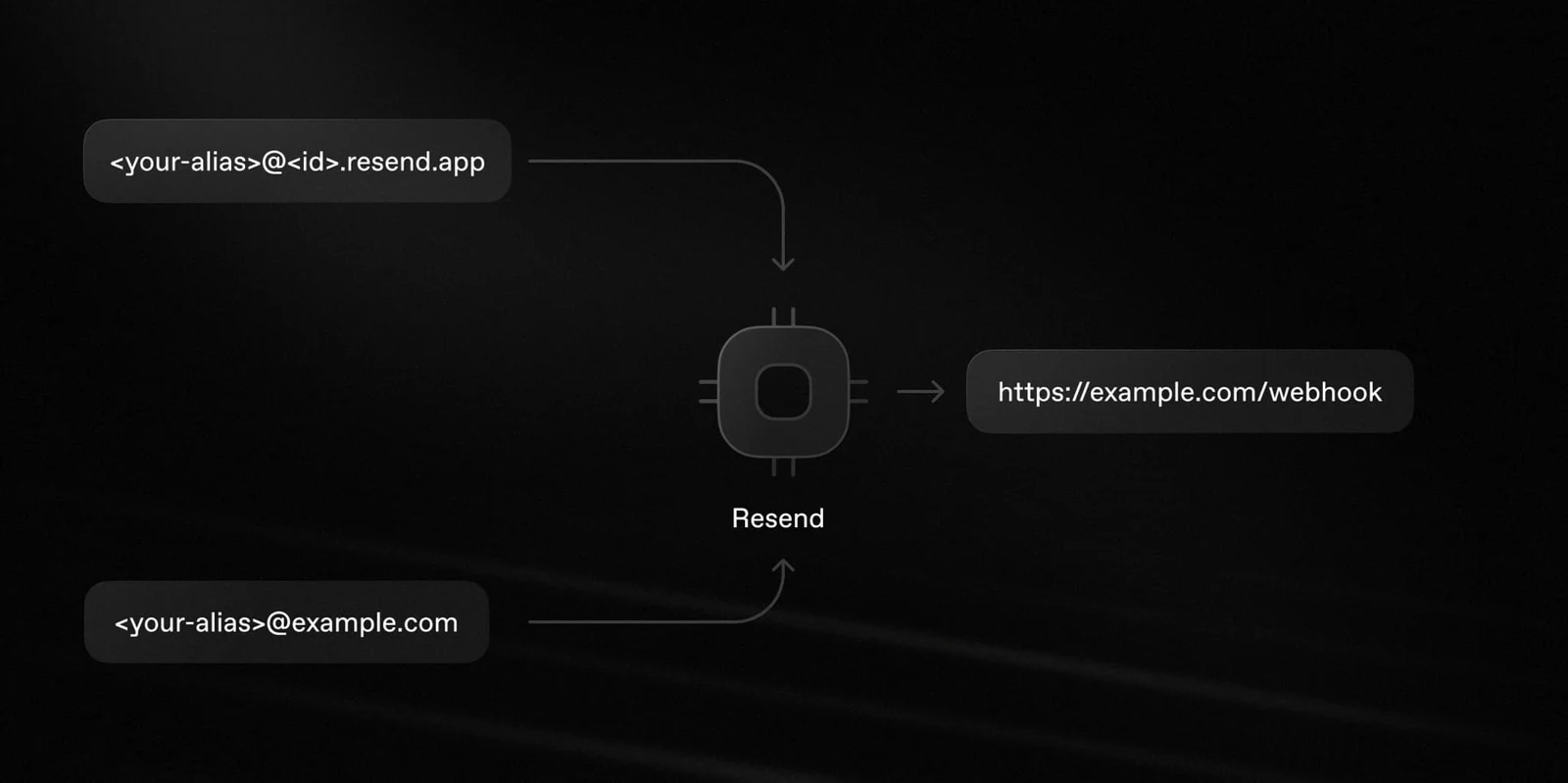
Resend introduced its Inbound service in November 2025. That service could receive mail, parse content, store attachments and notify an application through a webhook—an event sent to a server when mail arrives. Developers could inspect received messages in the dashboard and retrieve attachments through an API.
Inboxes adds a conversation and collaboration layer to that foundation. Consider a hypothetical support request that needs a colleague’s decision: an assistant could organize the thread and prepare a response, while the colleague reviews the exchange. That illustrates the new shared workflow; it is not a result from our own testing.
Forwarding changes the domain setup
An inbox uses an address on a domain added to Resend. The creation API requires verified DKIM and SPF, the domain records used for sending authentication. In the ordinary receiving setup, receiving must also be enabled and the inbound MX record must be verified or pending.
There is another route for an address whose mail already arrives elsewhere. Setting forwarding to true provisions a Resend receiving address without requiring a new MX record. The existing mailbox must then forward messages to that address. This offers a way to retain the existing mail destination, but does not remove the sending-authentication requirement.
The API also rejects an address already in use or a request that exceeds the team’s inbox allowance. Creating another address therefore depends on both domain readiness and plan capacity.
Drafting and sending remain different operations
The built-in agent’s settings expose instructions, tone and an explicit action list. Documented actions include drafting a reply, forwarding a thread, adding labels, assigning work, marking spam, archiving and moving a thread to trash. The list contains no send-reply action. That distinction matters when reading the announcement’s broader language about agents responding to email.
Other interfaces can send: Resend’s MCP documentation lists thread replies and sending drafts among its inbox tools. A team must distinguish the built-in agent’s configured actions from the capabilities of an external agent connected to those tools.
Settings updates also have a consequential detail: a supplied actions list replaces the existing list. An empty list disables all those agent actions, while omitted settings retain their current values. Changing a tone alone is different from replacing what the agent may do.
The connection determines what an agent can reach
Resend offers both hosted and local MCP servers, using the protocol that lets AI clients call external tools. However, its current tool documentation specifically limits Inboxes to the hosted remote server; the local resend-mcp package is not supported for these inbox tools. The hosted connection uses OAuth approval, with an API-key option for environments without browser login.
For a custom agent server, Resend’s official inbox skill documents a full-access API key for reading mail and registering webhooks. A sending-access key can reply, forward, create drafts and send drafts, but cannot read inbox messages or register webhooks. The guide warns that a full-access key can reach other projects in the account.
This is a separate boundary from the built-in agent’s action list. The same guide treats incoming mail as untrusted input and calls for webhook verification and restricted handling. Shared threads preserve conversation history; they do not make a sender’s instructions trustworthy.
Three inboxes share the email allowance
The Free plan lists 3,000 emails a month and a daily limit of 100. Every message sent or received through an inbox counts toward the transactional quota; the three included inboxes do not each receive a separate allowance.
Pro starts at $20 a month for 50,000 emails. Additional inboxes on paid plans require pay-as-you-go to be enabled and cost $1 each per month. Resend also lists plan-specific AI-credit allocations, so mailbox count alone is not a complete description of the service’s usage limits.
The useful change is shared email state with several ways to act on it. The deployment decision still turns on which connection can access the inbox and how much authority the agent receives.
Sources & method
AI-assisted reporting from Resend’s launch announcement, earlier receiving announcement, product and pricing pages, API documentation and official agent skill. These are vendor sources, not independent corroboration. We did not create an inbox, connect an agent or test email delivery.
- Resend: Announcing InboxesPublished October 22, 2026
- Resend: Inboxes product overviewAccessed October 24, 2026
- Resend: Inbound EmailsPublished November 3, 2025
- Resend API: Create InboxAccessed October 24, 2026
- Resend API: Update Agent SettingsAccessed October 24, 2026
- Resend: Official AI Agent Email Inbox skillAccessed October 24, 2026
- Resend documentation: MCP ServerAccessed October 24, 2026
- Resend: Pricing and inbox billingAccessed October 24, 2026
Source pages reviewed October 24, 2026. Analysis and suggested evaluation methods are AI Toolcast’s own.
This article contains no sponsored placement or affiliate links.
Found a possible error? How to report a correction.
Keep reading
NVIDIA adds document-image search to Nemotron 3.5 retrieval models
NVIDIA’s downloadable Embed and Rerank models extend search across text and document images. Existing text-index compatibility offers a migration path, while the smaller NVFP4 version carries specific hardware and runtime requirements.
Exa 3.0 adds cheaper agent search, with cached-content limits
Exa’s October 19 release adds Lite search and expands the information available to AI agents. Its implementation guides reveal limits on fresh page retrieval, clearer search warnings and a documentation mismatch over Dynamic Highlights.
Claude Duet opens US preview for proactive briefings and cloud tasks
Anthropic’s new assistant can check connected apps and continue work in the cloud. Its US Pro/Max preview adds approval-based purchases, but access, integration gaps and shared usage limits constrain the launch.