GitHub combines Copilot and notifications in its Teams app
The consolidation comes with a November 16 retirement deadline. Sandbox requirements, thread capture and separate cloud charges make the migration more than an app rename.
In this article
Quick answers
Who can use Copilot in Teams?
GitHub documents access through all paid Copilot plans. Setup also requires permission to install Teams apps and enabled cloud sandboxes. The integration remains in public preview.
What happens to the conversation?
GitHub says the whole thread becomes agent context and is stored in generated artifacts. A direct message can limit the context supplied.
The practical takeaway
The consolidated Teams app gives discussions a direct route to coding work, but administrators still control access, repository permissions and spending.
One app, two migration paths
GitHub combined Copilot and repository notifications in its Microsoft Teams app on October 23, giving teams a single place to receive updates and ask an agent to investigate them. The change also starts a migration: the legacy GitHub app will retire on November 16, 2026.
The upgrade path depends on the app already installed. Users of GitHub notifications should update it; GitHub says existing notification capabilities continue working. Users of the separate legacy GitHub app must install the consolidated app to retain Copilot in Teams. That older app will be renamed GitHub (deprecated).
What the consolidation changes
Copilot could already act on Teams conversations. GitHub's October 15 update described creating issues, making code changes and investigating bugs across several repositories within one conversation. Agent-driven coding in Teams therefore predates the October 23 consolidation, which brings that capability together with notifications.
The combined workflow starts with information a team already receives. GitHub's usage guide says issue and pull-request notifications form threads whose parent cards show status, assignees, reviewers and checks. Participants can then ask Copilot to investigate, plan or implement work, while colleagues add context and correct assumptions.
For example, a team discussing a reported defect could ask for an investigation before requesting a code change, then review the resulting pull request. This is an illustration of the documented workflow, not a test we conducted. Its practical value is keeping the discussion attached to the work while the agent runs asynchronously.
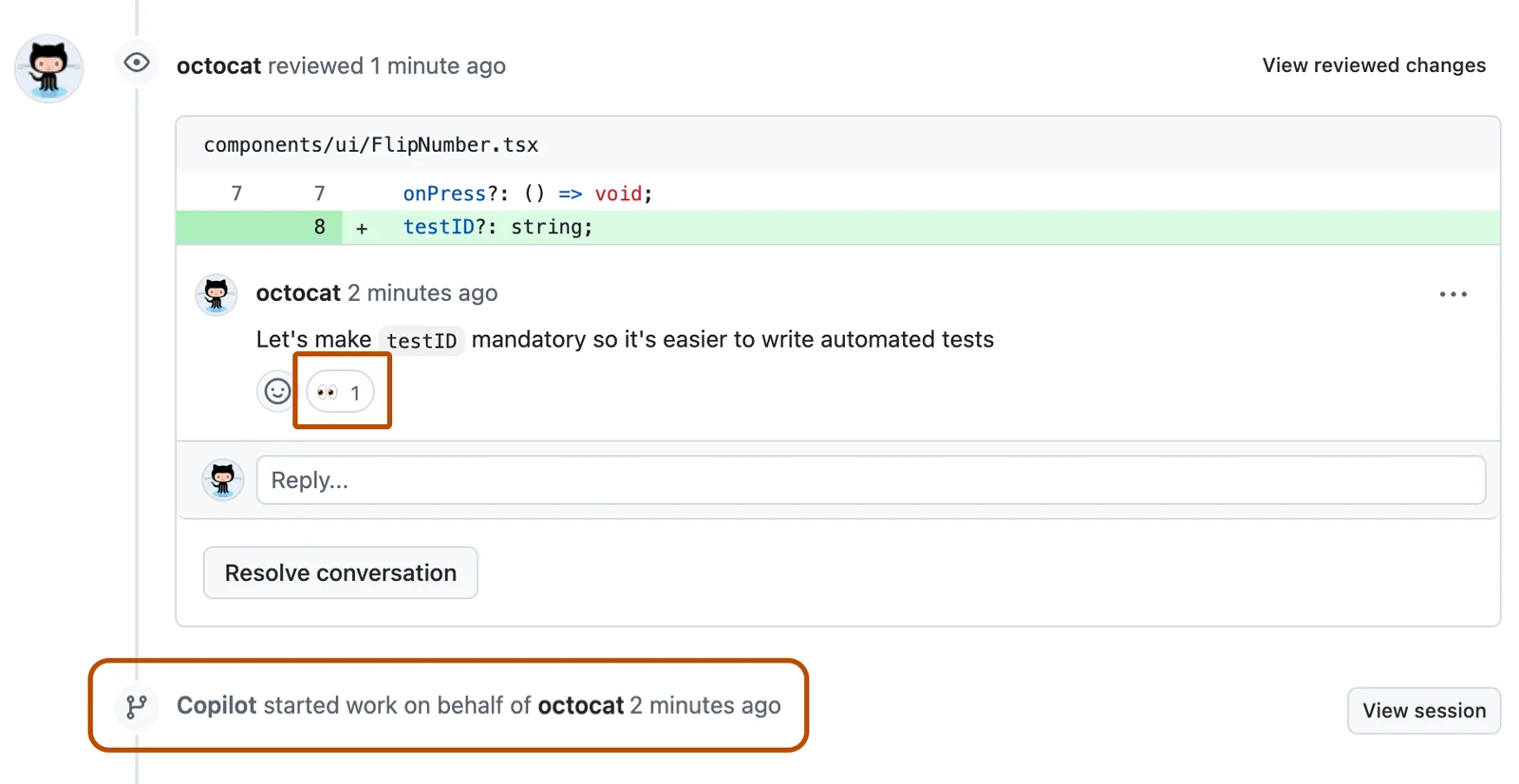
Work can continue on GitHub after the discussion. The cloud-agent guide documents requesting changes through a pull-request comment and checking the timeline for a started-work event. Review remains attached to the proposed code, with merging a separate step from the Teams conversation.
Paid access also requires enabled cloud sandboxes
GitHub's integration documentation lists paid Copilot access, and the broader setup guide requires a Teams workspace where app installation is permitted. Both guides still label the integration a public preview.
Cloud sandboxes must also be enabled. For organization-provided access, GitHub says cloud sandboxing is disabled by default and an organization or enterprise owner must enable it. The task runs remotely in a temporary, isolated Linux environment hosted by GitHub.
These requirements make installation only one part of adoption. An employee with a paid seat and a visible Teams app may still need an organization or enterprise owner to enable cloud sandboxes before the workflow is usable.
The thread becomes input, and identity changes the controls
GitHub says Copilot captures the entire thread and stores that context in generated artifacts. Starting a direct message can narrow what is supplied. That makes the conversation itself part of the coding input: unrelated or sensitive details in a shared thread matter beyond the immediate chat.
In direct messages, actions use the linked personal account's permissions. In a shared thread or channel, artifacts use the app's identity. Only repository writers can trigger changes; other participants can contribute input. Workspace guests and repository outside collaborators cannot start or steer sessions.
The usage guide adds a merging consequence: with repository rulesets, app-authored pull requests require one additional approval by default when the repository already requires at least one. Teams collaboration therefore does not erase the repository's review process.
The permissions reference also makes clear that this is an integration capable of changing repository content. Beyond reading code and repository information, Copilot requires content-write and workflow read/write permissions to open pull requests and initiate sessions.
The subscription is only part of the cost
GitHub lists individual Copilot Pro at $10 a month, with agent interactions consuming AI credits. Cloud execution has separate meters: $0.000024 per compute second, $0.000003 per allocated GiB-second of memory and $0.005 per GiB-month of snapshot storage. A plan's included AI allowance is therefore not an all-in price for this workflow.
Compute and memory metering stop when the sandbox is stopped, but its saved snapshot continues to incur storage charges until deletion. The billing guide still labels sandboxes a public preview while dating its $10 monthly trial entitlement only through July 2026. That expired offer does not establish free October usage.
Administrators can set sandbox product or SKU budgets and enable blocking when a limit is reached. GitHub explicitly excludes sandboxes from its Bundled AI credits budget type. Teams deployment thus brings two distinct spending controls to configure: the agent's AI allowance and the environment in which it works.
Sources & method
AI-assisted reporting from GitHub's announcements, integration guides and billing documentation, with original analysis. These are vendor sources, not independent verification. We have not tested the Teams integration or measured its performance.
- GitHub: Turn notifications into code with GitHub Copilot in TeamsPublished October 23, 2026
- GitHub: Multi-repository support and other improvements for GitHub in Slack and TeamsPublished October 15, 2026
- GitHub Docs: Integrating GitHub with TeamsAccessed October 26, 2026
- GitHub Docs: Integrating Copilot cloud agent with TeamsAccessed October 26, 2026
- GitHub Docs: Using GitHub in TeamsAccessed October 26, 2026
- GitHub Docs: Permissions for GitHub in TeamsAccessed October 26, 2026
- GitHub Docs: About cloud and local sandboxes for GitHub CopilotAccessed October 26, 2026
- GitHub Docs: Billing for cloud and local sandboxes for GitHub CopilotAccessed October 26, 2026
- GitHub Copilot: Plans and pricingAccessed October 26, 2026
- GitHub Docs: Using Copilot cloud agent on GitHubAccessed October 26, 2026
- GitHub Docs repository: licensing for documentation and assetsAccessed October 26, 2026
- Creative Commons Attribution 4.0 InternationalAccessed October 26, 2026
Source pages reviewed October 26, 2026. Analysis and suggested evaluation methods are AI Toolcast’s own.
This article contains no sponsored placement or affiliate links.
Found a possible error? How to report a correction.
Keep reading
Claude adds an Anthropic-managed Google Cloud option for agent tools
Anthropic's new access route brings Claude Platform features to Google Cloud customers. The implementation guides reveal separate account setup, regional pricing and agent controls behind the shared cloud bill.
Google releases Elephant-Goldfish plugin to review AI coding plans
Google's open-source plugin separates design conversations from fresh-context reviews. Its documentation reveals host-specific limits, human approval steps and the maintenance work behind reusable specifications.
Resend Inboxes adds shared email for agents, with setup and permission limits
Resend’s new inboxes combine conversations, team handoffs and agent controls. Its documentation adds consequential details: hosted-only MCP support for inbox tools, a forwarding option and different permissions for reading and sending.